Info Hud
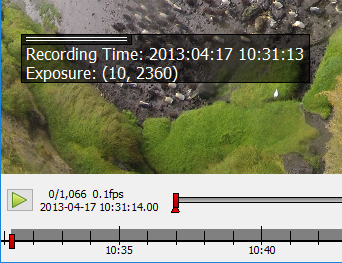
Example of the info hud displaying time and exposure exif data from a jpg file.
This info hud can display additional information for each image. Information can be obtained from the filename, jpeg exif information or tiff metadata or be provided by an external script.
The text can be set using the options dialog. Placeholders for additional information are written with curly brackets {}.
The keyword from the source (regex, exif or meta) is followed by the name of the information in brackets [], e.g.
{exif[rating]}. If the text is set to @script the info hud can be filled using an external script.
Use \n to start a new line.
To extract data from the filename a regular expression with named fields has to be provided.
Examples
Data from filename
file: "penguins_5min.jpg"

Info Text: "Animal: {regex[animal]} Time: {regex[time]}"
Filename Regex: '(?P<animal>.+?[^_])_(?P<time>.+)min'

Output: "Animal: penguin Time: 5"
Data from exif
file: "P1000236.jpg"

Info Text: "Recording Time: {exif[DateTime]} Exposure: {exif[ExposureTime]}"

Output: "Recording Time: 2016:09:13 10:31:13 Exposure: (10, 2360)"
The keys can be any field of the jpeg exif header as e.g. shown at http://www.exiv2.org/tags.html
Data from meta
file: "20160913_134103.tif"

Info Text: "Magnification: {meta[magnification]} PixelSize: {meta[pixelsize]}"

Output: "Magnification: 10 PixelSize: 6.45"
The values presented in the meta field of tiff files varies by the tiff writer. ClickPoints can only access tiff meta data
written in the json format in the tiff meta header field, as done by the tifffile python package.